redmine_reply_button Plugin Guide
redminepower
RedminePower

This is an explanation of the Redmine plugin “redmine_date_independent”.
This plugin allows you to configure the date synchronization settings for “Parent task attributes” on a per-project and per-status basis.
Download it from here.
In the following sections, we will explain the necessity of using different date synchronization settings, and then describe the specific plugin configuration methods.
Please stay with us until the end.
Let’s organize this by focusing on the relationship between parent and child issues. Typically, when work is divided into parent and child issues, there is a containment relationship, but strictly speaking, there are two types of divisions:
Let’s look at a concrete example to see the difference between the WBS method and the ToDo method.
For instance, suppose new development must go through four phases: “Functional Specification,” “Design,” “Implementation,” and “Testing.” If there is a new project called “Basic Authentication Support,” the following issues would be created:
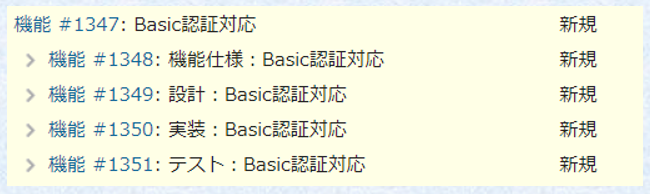
Here, the relationship between “#1347 Basic Authentication Support” and each of the “Functional Specification,” “Design,” “Implementation,” and “Testing” issues follows the WBS method. In other words, when “Testing” is completed, “Basic Authentication Support” is complete, and if the “Testing” due date is extended, the “Basic Authentication Support” due date is automatically extended.
Now, suppose during the “Functional Specification” review, someone raised the point that “we need to confirm the implementation method with Department XX.” To avoid forgetting this, a child issue “#1352 Confirmation with Department XX” is created under “#1349 Design.”
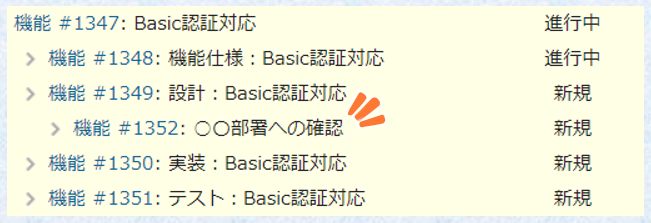
In this case, the relationship between “#1349 Design” and “#1352 Confirmation with Department XX” follows the ToDo method. While “Confirmation with Department XX” needs to be completed before “Design” can be finished, completing “Confirmation with Department XX” doesn’t mean “Design” is complete, and the due dates will be different.
As shown above, within a single project, there are often cases where you want to synchronize parent and child issues (= WBS method) and cases where you don’t want to synchronize them (= ToDo method) mixed together. However, Redmine settings require you to choose either “Derived from child issues (= want to synchronize)” or “Independent (= don’t want to synchronize),” and this setting is applied uniformly to all issues regardless of project or tracker.
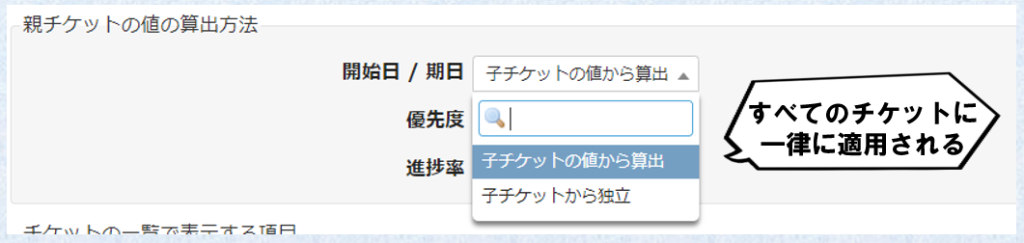
In other words, if the setting is “Derived from child issues (= want to synchronize),” you cannot add child issues like “Confirmation with Department XX” mentioned earlier. Conversely, if “Independent (= don’t want to synchronize)” is selected, you need to manually reflect changes in child issue due dates to the parent issue, which can feel cumbersome in some situations.
This is where “redmine_date_independent” comes in.
With this plugin, you can flexibly configure “Parent task attributes” according to project and status.
Let’s look at the specific configuration methods below.
Place redmine_date_independent in the Redmine plugins folder, run the DB migration, and restart Redmine. You can execute it with the following commands:
$ cd /var/lib/redmine/plugins
$ git clone https://github.com/RedminePower/redmine_date_independent.git
$ bundle exec rake redmine:plugins:migrate NAME=redmine_date_independent RAILS_ENV=production
$ httpd -k restart
After successful installation, “Start/Due Date Independence” will appear in the administration screen. From here, add settings to configure “Parent task attributes” in detail.
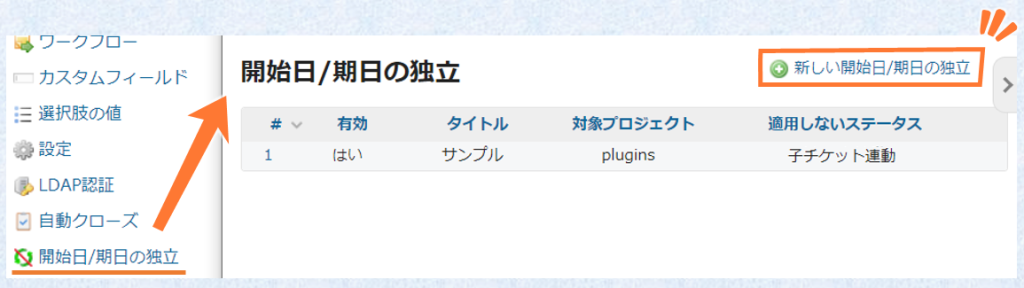
Click “New Start/Due Date Independence” to open the add screen. This plugin assumes that “Start date/Due date” is set to “Derived from child issues (= want to synchronize)” as the global setting. Then, you add projects where you want “Independent (= don’t want to synchronize)” individually.
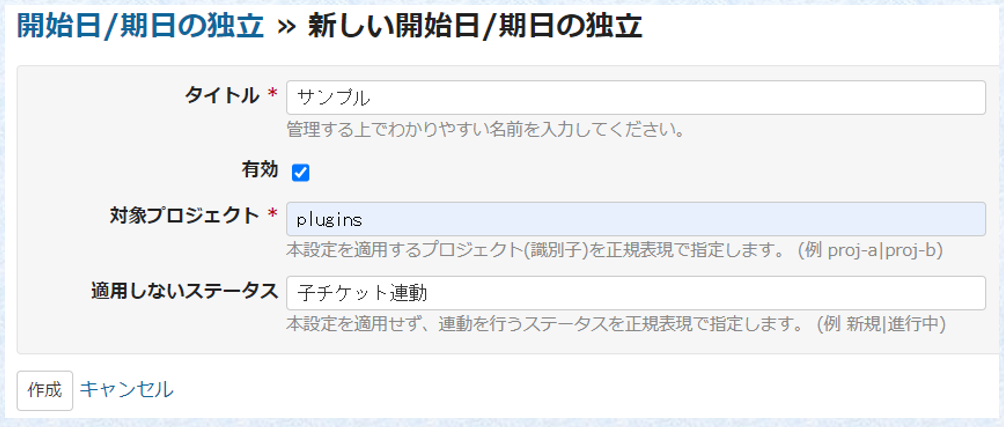
After completing each setting, click “Create” to add the “Start/Due Date Independence” setting.

This concludes the explanation of the plugin “redmine_date_independent.”
What did you think?
While the functionality itself is not that complex, explaining it in writing made it somewhat lengthy.
In issue-driven development, there will always be situations where you want to synchronize with parent issues and situations where you don’t. However, since the setting is applied uniformly to all issues, you might be told that it cannot be easily changed. While that reasoning is understandable, it can still be frustrating.
We hope this plugin helps those who have such concerns!
This time we talked about due dates, but Redmine Power also provides a plugin that “closes the parent issue when all child issues are closed” (redmine_auto_close).
Please give that a try as well!